
Black and Decker Rotary Multi Tools

Loading...
End of content
Error - No more pages to load
Black and Decker Rotary Multi Tools at MyToolShed.co.uk
Black and Decker rotary multi tools are compact, lightweight tools built for detailed work around the home, workshop and hobby bench. With an interchangeable accessory system, one tool can cut, grind, sand, sharpen, engrave and polish, so it suits everything from tidying up metal edges to fine craft projects.
Browse the Black and Decker range here, along with the Rotary Multi Tool Accessories you need to keep your tool working across more materials and tasks.
Black and Decker Rotary Multi Tools Features and Benefits
- Cordless 7.2v power: Work without trailing leads, so you can reach awkward spots and move freely around the job without hunting for a socket.
- Interchangeable accessories: Swap between cutting, grinding, sanding, sharpening, engraving and polishing attachments to cover many tasks with a single tool.
- Five-setting speed dial: Choose a lower speed for delicate polishing and engraving, or a higher one for cutting and grinding, giving you intuitive control over the finish.
- LED ring light: Lights up the work area, which helps in dark corners and when you are tackling detailed jobs that need precision.
- Compact size: Easy to hold and control for extended detailed work, with less fatigue than a larger tool.
Popular Black and Decker Rotary Multi Tools
Cordless Rotary Tool Kits
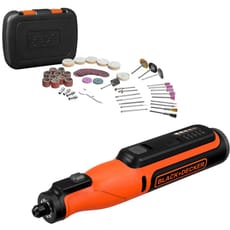
The Black and Decker CRT8IK 7.2v Cordless Rotary Tool with 52 Accessories is a ready-to-use kit for household and hobby applications. It suits tasks such as sharpening garden tools, smoothing and shaping small workpieces, removing rust, engraving names onto tools and polishing metal or trim.
Rotary Multi Tool Accessories
Extra accessories let you replace worn attachments and tailor the tool to the material in front of you, whether that is cutting, sanding or polishing.
Frequently Asked Questions
What can I use a Black and Decker rotary multi tool for?
You can use it for cutting, grinding, sanding, sharpening, engraving and polishing. It is well suited to household repairs, craft projects and hobby work where small, accurate tools are needed.
How do I choose the right speed setting?
Use the five-setting speed dial to match the task. Lower speeds give more control for engraving and polishing, while higher speeds suit cutting and grinding. Start low on unfamiliar materials and increase gradually, using the LED ring to check your progress.